The rebound method: win your competitor's unhappy customers
People who just had a bad time with a tool are the easiest to win. Their complaints are public. Here is how to turn them into a cold email, step by step.
- Free
- 1 public page
- 1 free scraper
- 2 copy-paste prompts
- About 15 minutes
The short version
- Find the reviews. Open your competitor on Capterra. Filter the rating to 1 and 2 stars.
- Scrape them. Use Instant Data Scraper, a free Chrome extension. Save the file.
- Ask Claude what these buyers want and aren't getting. You get the biggest complaints, with job titles.
- Ask for the email. You get a cold email in the words buyers really use.
- Send it to people in the same job at companies still using that tool. Never to the reviewer.
1. Find the reviews
Capterra is a public review site for business software. Each review shows the writer's job title, and that is what makes this work.
- Open Capterra and search your competitor's name. You don't need an account.
Open Capterra → - Open the tool's page and go to its Reviews.
- Click "Rating" and tick 1.0 and 2.0. Now you only see unhappy customers.
- Read the count. The line "Showing 1-25 of …" tells you how many there are.
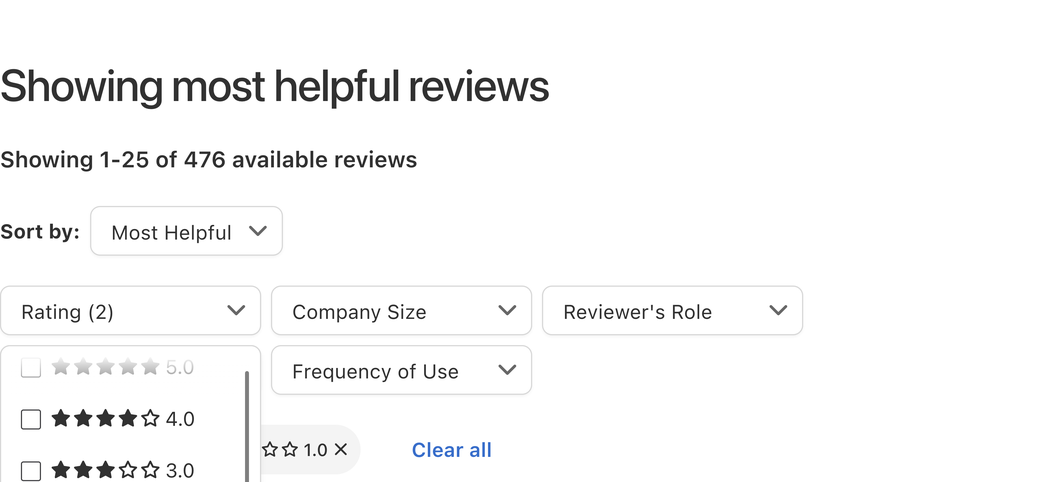
How big can it be?
The tool in the Reel had 8,542 reviews on the day we looked. 277 of them were one star. 476 were one or two stars. Your competitor's worst days are sitting on one page.
2. Scrape them
You could copy each review by hand. A free scraper does it in one go.

- Add it to Chrome.
Get Instant Data Scraper → - Go back to the filtered reviews and click the extension's icon. It finds the list of reviews by itself.
- More than one page of reviews? Show it the site's "next page" button, then let it run through the pages.
- Save the file as CSV or Excel.
3. Ask Claude what they want
Open Claude, start a new chat, and add the file (or paste the reviews). Then send this:
Claude found 7 groups of complaints. Here are three of them, in its own words:
1. Support that solves problems instead of deflecting them
This comes up in more than half the reviews.
- Owner, Accounting, Administration: spent 3.5 hours on the phone and the problem is still there.
- Language Arts Tutor: can never reach the same person twice, so has to explain everything again on each call.
2. Software that works
- CFO: the software crashes at least three times a day, and they've called support 11 times in 7 months.
- Owner: can create a customer but not an invoice, and has to log in and out several times.
4. Prices that match the value, and help that isn't behind a paywall
- Owner: was quoted $550 to fix a bug on a $35/month plan.
- President: had to buy an upgrade just to get a callback, then was pitched another upgrade on that call.
And it told us who to talk to: "Owners and Presidents, the people paying, drive most of the support, pricing, and upsell complaints."
4. Get the email
Stay in the same chat and send this:
Hi [First name],
I saw [Company] [is hiring a bookkeeper with [their tool] experience — swap in how you know]. So, a quick question:
Is [their tool] still a "necessary evil" for you?
I've been reading what owners say about it, and the same phrases keep coming up: paying more every year for the same product. Being told it's "a glitch." Sitting on hold, then getting pitched an upgrade before anyone fixes the actual problem. One owner summed it up: "I just want to enter some bills and payments."
That's what [Product] is built for:
- A real person answers. [Same rep each time / avg. answer time]
- One price, [locked for X years]. No upgrade needed to get help.
- We move your [their tool] history over for you, [in X days].
Would 15 minutes be worth it to see if switching actually saves you time? If not, just reply "not now" and I won't follow up.
[Your name]
[Title, Company]
[Phone]
Claude added one note: "In the three bullets, keep only promises your product can actually deliver: these buyers have already been burned by sales claims that didn't hold up."
Before you send it
- Fill every bracket. The three bullets must be things you really do.
- Check each quote against the reviews. In our run, Claude wrote "one owner" for a line that a Board President wrote. Small, but fix it.
- Write one email per job title. An owner cares about price. A bookkeeper cares about extra clicks.
Two more prompts that help
5. Who to send it to
Send it to people in the same job, at companies still using that tool. They feel the same pain. They just haven't written a review yet.
Three ways to find companies still using it
Job posts
Search a job board for the tool's name. A company asking for "experience with" that tool is using it today. This is also a natural first line, as in the email above.
Your competitor's own site
Look for its "Customers" or "Case studies" page. It lists the companies it is proud of, by name.
The company's website
Some tools show on a site: a chat box, a booking page, a form. Look for the small "powered by" mark at the bottom.
The rules
- Never email the reviewer. They did not ask to hear from you.
- Never use a reviewer's name. Use their words, not who they are.
- Don't attack your competitor. Ask a question. Let the reader say it.
- Say "owners say…", because reviews are opinions, not facts.
- Promise only what you do. These buyers were already let down once.
- Make "no" easy. The email above ends with: reply "not now" and I won't follow up.